
For many clients, grasping the real scale of a project is one of the most difficult parts of starting an outdoor living design.
Even with an exceptional design, precise measurements, and a thorough explanation, designers report that clients still struggle to understand how a project will truly fit their existing space — even when they are excited about the 3D plans.
What if your clients could actually walk around and experience your design — full scale, in real time, in their own backyard?
Introduce your clients to their future outdoor living space with YARD, a groundbreaking augmented reality app that harnesses the power of Vip3D to showcase outdoor living designs in a completely new way.
YARD combines the most immersive strengths of both 3D and Virtual Reality to deliver a new, unparalleled design experience that will genuinely impress your clients. Its Augmented Reality (AR) doesn’t just overlay your design — it enhances reality, giving your clients a truly engaging, visually striking way to explore your ideas right in their own outdoor living space.
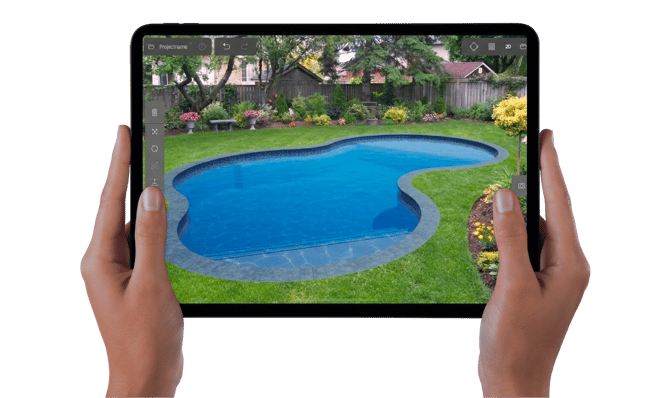
Unlike 3D designs — which look best when you also draw the house, the property, and maybe even the neighbor’s place to help situate your client within the design — AR does not require any extra steps: just drop the pool straight onto their lawn. And unlike Virtual Reality (VR), which needs a fully designed 3D environment as well as a headset to immerse your clients in your design — AR transforms your client’s outdoor space instantly and reveals, through an iPad Pro, exactly how your design will look, right in front of them.
It’s a great way to focus your client’s attention on the specifics of your design, fast. Showcase just the pool, reveal a few new driveway patterns, and explore the best layout for your client’s amazing new outdoor kitchen. All that, and much more, is easy to do — instantly, in just a few simple taps, while walking around your client’s actual lawn.
Save Time
When you use YARD to reveal your client’s future outdoor living space to them, you instantly layer your design ideas directly over their existing yard. It’s easy to use YARD to reveal a new swimming pool, update an outdoor kitchen, or even just move the furniture on the deck to show your client how to improve the flow and enjoy the best view.
With YARD, you transform your client’s very own yard right in front of them — and instantly improve it with your design ideas.
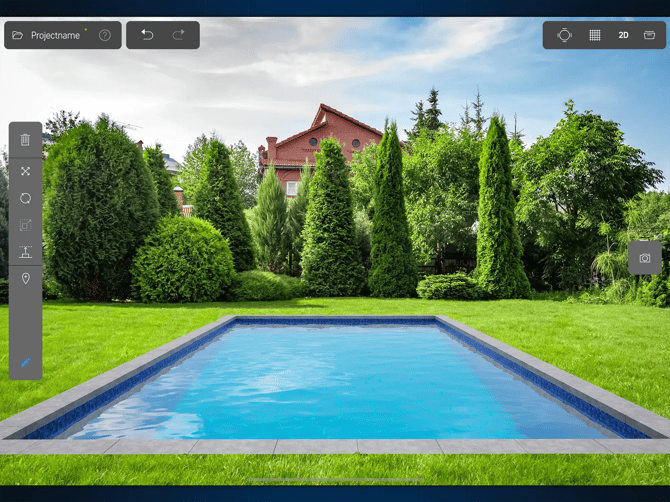
Capture the Best Views
When a client loves their family home, they often note details like the great view or the big windows among the reasons why they chose it. Maybe they have a gorgeous view of the sunset, or a copse of beautiful shade trees. Perhaps they want to be able to enjoy seeing their garden grow from their kitchen, or they want to watch their kids play as they prepare dinner.
Seeing how a project captures the best views is often one of the most breathtaking elements of a design for clients — and now, with YARD, your clients get to enjoy their view from an entirely new, even more immersive perspective.
Walk around their yard and show them how you’ve placed their spa to frame the best view of their yard — while standing exactly where you’ll build it. Stroll over to the new fireplace and let them see how the placement you’ve chosen offers them a relaxing view — one that makes their yard feel like a private retreat.
While 3D designs — like those made in Vip3D — offer your clients an immersive experience that gets very close to matching reality, YARD goes one step beyond and offers your client a completely new way to see how your design transforms their reality, in real time.
Reveal Ideas, Fast
Because YARD builds on the precise, accurate technology behind Vip3D and incorporates the latest advances in AR, YARD now makes it possible to reveal the scale and scope of your design to your clients like never before.
Offer your clients an unprecedentedly immersive new experience, faster than ever: show them how to make the most of their space — and their view! — while standing on their existing lawn with an iPad Pro.
With Yard, making changes to address your client’s needs, concerns, and ideas — like moving the pool or the spa around the yard or trying out a new location for their fireplace — is now completely effortless: just drag features to a new area on the tablet screen. Perhaps your client wants to see how a freeform pool will look, instead of a rectangular one? Or perhaps they want to see how a different pool would look from a different side of the yard? Whether you want to explore a multitude of ideas or try out a few quick iterations, YARD makes it a breeze.
Your tablet becomes your sketchpad — and your clients can instantly explore the results from any angle.
How does YARD work?
There are two easy ways to use YARD to speed up the design process and amaze clients:
1. Sketch design concepts
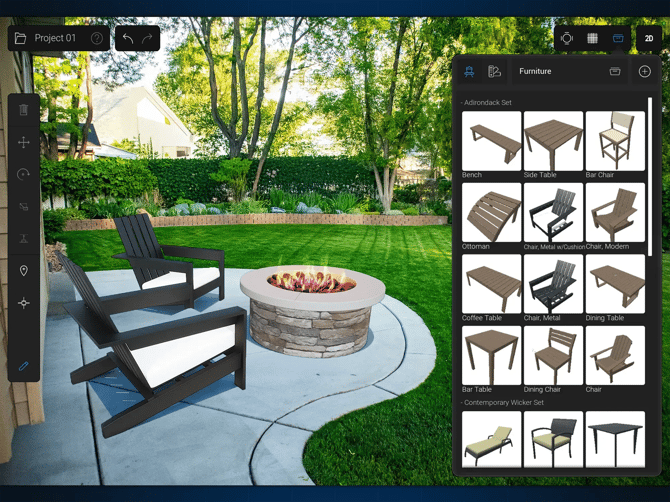
It’s easy to use YARD to sketch a few quick ideas on your iPad Pro, right in front of your client. Add a grill to their counter, place some lawn furniture, and draw a freeform pool right onto the lawn. Placing objects instantly — with just a few taps to your iPad Pro— makes it easy to get instant feedback from your clients.
Quick sketches are best for getting ideas in front of a client in real time — it’s a great way to get started exploring new ideas. Downloading a few templates onto your tablet makes it even easier to toss a few ideas onto the yard to see what your client likes, without any significant time investment. The process is remarkably straightforward.
2. Use the full suite of Vip3D tools
As exciting as it is for clients to see quick design ideas right on their lawn, many clients also want to see the full design that you’ve created for them. That’s why YARD works right alongside Vip3D. Once you design a project with the full suite of tools in YARD, you need only click a quick button to export your design directly into YARD, ready to edit and explore with your clients.
Everything that you draw in Vip3D — the pool, the deck, the spa, the furniture, the plants, the outdoor kitchen — can be dropped right onto your client’s backyard, ready for them to walk around and explore. During an initial presentation, for example, you might choose to use templates. And during a final presentation, you might choose to reveal everything that you’ve designed in Vip3D with YARD.
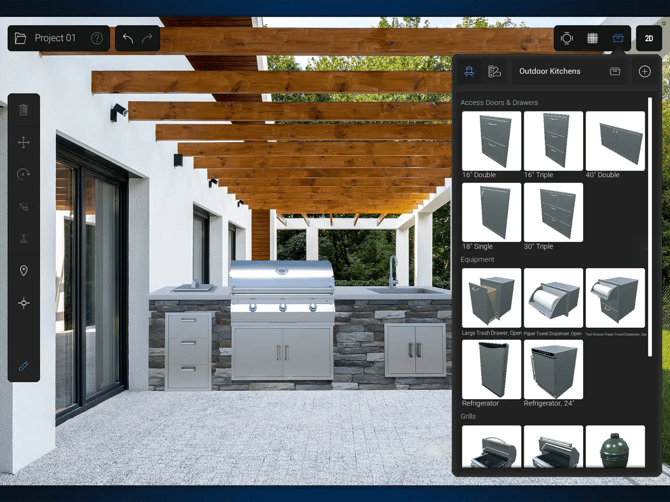
YARD makes it easy to explore the details at every stage in the process. Whether you’re sketching a few quick ideas at an initial meeting at their house, you’re using templates to share even more options, or you’re walking your client through your full design — YARD builds your client’s enthusiasm, motivating them to choose the ideas you share with them.
And, because YARD works so seamlessly with Vip3D, all YARD sketches that your client enjoys can be loaded into Vip3D, ready for you to make any necessary changes.
Amaze Your Clients: Everyone Benefits from YARD
Augmented Reality is perfect for pool designers, hardscape and landscape designers, and outdoor kitchen designers because it merges the power of Vip3D with the latest AR technology.
Because the AR technology powering YARD uses your iPad Pro’s camera to overlay design elements directly on the surrounding environment, it is at its best when revealed on-site, right on a client’s own property.
That’s because AR — which augments reality — is most impressive and most visually amazing when it augments your client’s own reality. Although it is, of course, possible to drop design elements anywhere there is sufficient light to do so — it is most useful when clients get to see how new design elements will look in their own outdoor living space.
The true power of YARD is revealed when we use it to augment the reality that we’re changing: it helps clients understand the scale and scope of a project in their own yard like never before.
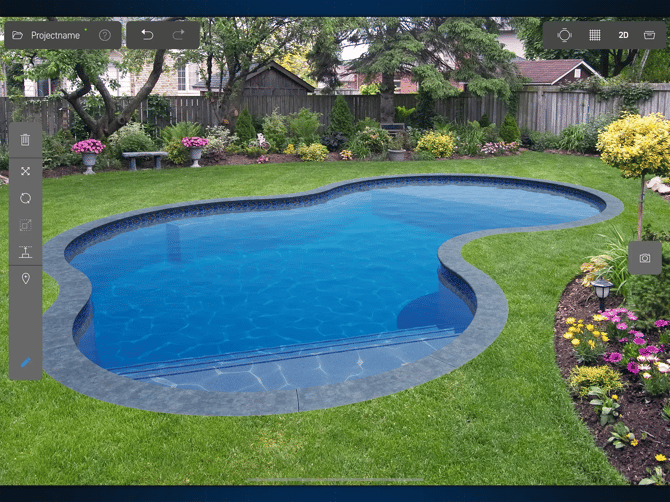
In order to create for your client the best and most visually engaging AR experience, it’s important to make certain that your tablet and the lighting are both ready to go:
- Computing Power. While the iPad Pro is currently the most powerful tablet on the market to support AR, it can’t compete yet with a full desktop or even a laptop computer. Therefore, YARD currently works best for small to medium projects — ones that can be fully explored before the iPad Pro simply runs out of power. The images included here are good examples of how much an iPad Pro can currently run at one time.
- Lighting. As powerful as YARD and the iPad Pro are together, the tablet camera requires sufficient light in order to map the client’s property. That’s why YARD and the iPad Pro work best during daylight.
Welcome to YARD
To get started, log in to your account, and click Get YARD.
Soon, we’ll be sharing even more exciting new tools and features for YARD. We’re certain that this is just the beginning of what will be possible with AR. The potential is extraordinary — for designers, for clients, and for the entire industry — and we can’t wait to see how you put YARD to work!
When you give YARD a try, let us know what works, what doesn’t — and what your clients enjoy the most. As we continue to develop YARD, we’ll be incorporating your feedback to make sure that YARD offers you and your clients the most extraordinary experience imaginable.