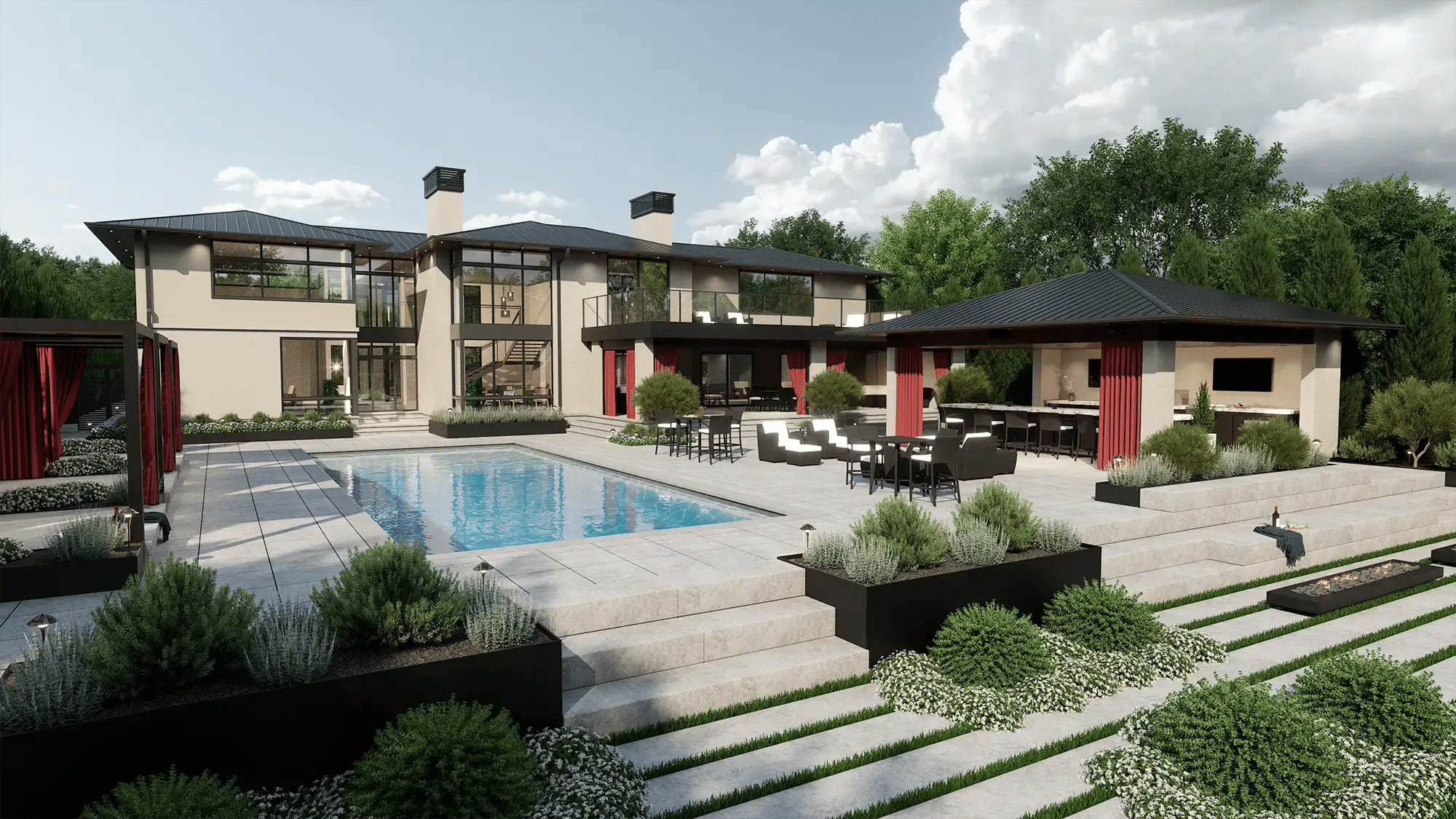




If you design outdoor living spaces, one of the biggest differences between VizTerra and AutoCAD is what happens after the initial plan is drawn. In VizTerra, you draw in 2D, switch to an interactive 3D view in one click, and keep designing with the measurements from your plan, along with plants and materials from the built-in library.
You can walk clients through the design, make changes with them during the meeting, and prepare construction plans from the same project file.
AutoCAD is general-purpose drafting software used across architecture, civil engineering, construction, and manufacturing. Its precision and the DWG format are among the reasons many firms rely on it. A precise 2D plan can still be difficult for a client to picture, though, and a finished 3D presentation for an outdoor living project may require additional visualization workflows, along with plant, material, and object libraries your firm has assembled.
We build VizTerra, and many of our Members come to it with experience using AutoCAD. Below, we look at what each program does well, where the workflows differ, and when it may make sense to use both.
Key Takeaways
The short version, before the full comparison.
- VizTerra is landscape design software built for landscapes, hardscapes, outdoor kitchens, decks, and pergolas. AutoCAD is a general 2D and 3D CAD platform from Autodesk, used across architecture, civil engineering, construction, and manufacturing.
- In VizTerra, you draw in 2D, switch to interactive 3D in one click, and continue designing with built-in plants and materials, Smart Data calculations, and construction documentation, all in the same project.
- AutoCAD is the industry standard for precision drafting and for exchanging files between disciplines. It supports 3D modeling and rendering with general-purpose tools rather than landscape-specific ones.
- VizTerra costs $97 per user per month, or $84 per month on an Annual Membership, which is $997 a year, plus a one-time $95 setup fee. Full AutoCAD runs roughly $250 to $260 monthly, or about $1,900 to $2,100 a year, and AutoCAD LT costs roughly $500 a year for 2D drafting.
- DWG is a common file format among engineers, architects, surveyors, and other professionals working on the same project. You can import DWG files, such as a survey or site plan, to start a VizTerra project, and export the 2D view of your design for use in AutoCAD.
Feature Comparison Snapshot
The differences show up most clearly in what each program includes for outdoor living work, and in how a design moves from the plan to the presentation and the construction documents.
|
Capability |
VizTerra |
AutoCAD |
|---|---|---|
|
Built for |
Landscapes, hardscapes, outdoor kitchens, decks, and pergolas. |
Every industry that drafts, from architecture and civil engineering to manufacturing. |
|
One-click 2D to 3D |
Yes. Draw in 2D, switch to fully interactive 3D in one click, and both views stay in sync as you revise. |
3D modeling and rendering are available, with general-purpose tools rather than landscape-specific ones. |
|
Landscape and hardscape library |
Built in and organized around the work our Members do: more than 1,700 plants and trees, more than 1,200 HD materials, and more than 1,900 3D objects. |
Not included. Landscape content is built, purchased, or sourced separately. |
|
Measurements and quantities |
Calculated as you design and placed onto build-ready plans from the same project file. |
Precise 2D drafting, annotation, and dimensioning. Landscape takeoffs such as plant counts are manual or need an add-on. |
|
Real-time 3D visualization |
Included with your Membership, with images up to 8K and lighting from day to dusk to night. |
Client-facing visuals typically need separate rendering tools or plugins. |
|
DWG as a coordination format |
Imports DWG and DXF files, and exports the 2D view of your design as DXF, along with PDF and image files. |
The industry standard for exchanging drawings across disciplines. |
|
Specialized toolsets |
Tools for landscape and outdoor living design are included in the software rather than sold as separate toolsets. |
A full AutoCAD plan includes specialized toolsets for Architecture, Electrical, Mechanical, MEP, Map 3D, Plant 3D, and Raster Design. |
|
Platform |
Windows, with a dedicated graphics card. |
Windows and Mac, plus web and mobile apps. The specialized toolsets are available only on Windows. |
|
Learning curve |
A guided, step-by-step workflow from 2D planning to interactive 3D, presentations, and construction plans, with no drafting background required. |
A broad set of drafting, modeling, annotation, and coordination tools, often learned through formal training. |
|
Lower-cost options |
One Membership, with GIS and 3D terrain data and the YARD augmented reality app available as add-ons. |
AutoCAD LT at roughly $500 a year for 2D drafting, or Flex tokens for occasional day-based use. |
What VizTerra and AutoCAD Are Built For
Both can produce plans a crew can build from, but VizTerra is built specifically for landscape and outdoor living design, while AutoCAD is built for general-purpose drafting across many disciplines.
VizTerra
VizTerra is professional landscape design software from Structure Studios, built for landscapes, hardscapes, outdoor kitchens, decks, and pergolas. We’ve been building software for the outdoor living industry since 2001, and 2026 marks 25 years.
It’s part of a family of three programs. Pool Studio adds custom pools, spas, water features, and ponds, and Vip3D adds advanced drafting, cross sections, and SketchUp, FBX, and OBJ import. See what VizTerra covers in detail.
AutoCAD
AutoCAD is a general-purpose 2D and 3D CAD platform from Autodesk, first released in 1982 and used across architecture, civil engineering, construction, and manufacturing. It’s the reference point for precision drafting, and DWG is the format the rest of the built environment speaks.
A full plan also includes specialized toolsets for architecture, electrical, mechanical, MEP, mapping, and plant design, along with web and mobile apps and Autodesk’s newer AI-assisted drafting features. That breadth is the product.
Learning Curve
AutoCAD is a broad, general-purpose CAD program with a range of drafting, modeling, annotation, and coordination tools. It can be learned through formal classes, self-paced training, and hands-on practice, but its breadth gives new users more to learn.
For professionals who rely on those capabilities across multiple disciplines, that flexibility can be valuable.
VizTerra is built specifically for landscape and outdoor living design, with a guided, step-by-step workflow that doesn’t require a drafting background. You start with a 2D plan, continue designing in interactive 3D, and prepare client presentations and construction documentation within the same project.
Members can also build their skills at their own pace with a comprehensive, regularly updated library of training videos, covering everything from the fundamentals to advanced design techniques.
From 2D Plan to 3D Presentation
One of the biggest workflow differences is what happens after the initial plan is drawn.
In VizTerra, you draw the project in 2D, then move to fully interactive 3D in one click. Both views stay in sync as the design changes, so you can make revisions during a client meeting without redrawing the plan.
Interactive 3D is where the design continues. You can shape terrain, change paving materials, adjust lighting, refine planting, and present the project from the same file.
AutoCAD also supports 3D modeling and rendering, but its tools are general-purpose rather than built specifically around landscape and outdoor living design. Creating the same kind of presentation typically requires more manual setup of geometry, materials, landscaping elements, and the overall 3D scene.
That flexibility makes sense for a program designed to serve many disciplines. For landscape professionals, VizTerra brings those design and presentation steps into a workflow built specifically for the work you do.
Construction-Ready Documentation
AutoCAD gives professionals extensive control over 2D drafting, annotation, dimensioning, and documentation across many types of projects. VizTerra approaches construction documentation from a landscape-specific workflow, connecting the plans and calculations directly to the design.
With VizTerra’s Smart Data, square footage, material quantities, and linear footage are calculated as you design, with no need to work the numbers out by hand. Those calculations can be added to the build-ready plans you produce from the same project file as your 2D and 3D design.
For projects that require expanded construction documentation, Vip3D offers features such as automatic spec sheets and cross sections of design elements.
File Compatibility and Multi-Discipline Coordination
File compatibility becomes especially important when landscape projects involve architects, engineers, surveyors, or other professionals. DWG is a common format for exchanging drawings across those disciplines.
VizTerra imports these files, so you can bring an existing survey or site plan into the project rather than redraw it. You can also export the 2D view of your design as a DXF file for use in AutoCAD, as well as create PDF and image files for sharing.
That makes it possible to use each program where it fits best. A survey or site plan can come into VizTerra as the starting point for the landscape design, while exported drawings can return to AutoCAD when additional coordination is needed.
For projects that involve engineering, architectural work, or other disciplines outside the landscape scope, AutoCAD may remain part of the workflow. VizTerra handles the landscape design, interactive 3D presentation, and build-ready plans within the same project.
Who Each One Fits
Here’s the split as we’d explain it to someone deciding this week.
|
Your situation |
Where to look |
Why |
|---|---|---|
|
Landscape, hardscape, or deck work is most of your business |
VizTerra |
The libraries, calculations, and construction plans are built for outdoor living, so the workflow is ready on day one. |
|
You coordinate with civil engineers or architects on most jobs |
AutoCAD plus VizTerra |
DWG is the shared format for that coordination, and the survey or site plan comes into VizTerra as the starting point for the landscape design. |
|
You have no drafting background |
VizTerra |
A guided workflow takes you from a 2D plan to a finished project without a CAD education first. |
|
You need engineering-grade precision beyond landscape scope |
AutoCAD |
Structural, civil, and mechanical work sits outside what landscape software is built to do. |
|
Client presentations are a large part of your week |
VizTerra |
An interactive 3D walkthrough with real-time visuals is included rather than assembled. |
|
Pools or water features are part of the work |
Pool Studio or Vip3D |
Both add custom pools, spas, and water features to everything VizTerra offers, and both include live training. |
Pricing Comparison
A VizTerra vs. AutoCAD decision usually starts here. Full AutoCAD runs roughly $250 to $260 per month, or about $1,900 to $2,100 a year depending on where you buy.
VizTerra runs $97 per user per month, or $84 per month on an Annual Membership, which is $997 a year, plus a one-time setup fee of $95. The full Membership pricing covers all three programs.
Compared with full AutoCAD, VizTerra costs less. But full AutoCAD also includes capabilities that many landscape professionals may not need, so AutoCAD LT can be a more useful comparison.
AutoCAD LT is designed primarily for 2D drafting and costs less than VizTerra. It doesn’t include VizTerra’s landscape-specific libraries, one-click switch between 2D and interactive 3D, built-in visualization workflow, or automatic landscape calculations.
The two products therefore serve different needs at different price points. If your work centers on 2D drafting, AutoCAD LT may provide what you need. If you want to design, present, calculate materials, and prepare build-ready plans within the same landscape-focused workflow, VizTerra brings those capabilities together.
|
One designer |
VizTerra |
AutoCAD |
|---|---|---|
|
Software |
$84 per month on an Annual Membership ($997 a year), or $97 monthly |
Roughly $1,900 to $2,100 a year for full AutoCAD, or about $500 a year for AutoCAD LT |
|
One-time setup |
$95 |
None published |
|
Landscape library |
Included and organized around outdoor living work |
Built, purchased, or sourced separately |
|
Real-time 3D |
Included |
Separate rendering tools or plugins |
|
Quantities and takeoffs |
Included through Smart Data |
Manual, or an add-on tool |
|
Training |
Recorded video library included. Live workshops included with Pool Studio and Vip3D |
Widely available and usually paid |
|
Occasional-use option |
Pay as you go monthly, cancel anytime |
Flex tokens, priced per day of use |
|
Computer |
A Windows PC meeting the Version 4 requirements: Windows 11, Core i7, 16GB, RTX 4060 or greater |
Windows or Mac, with lighter requirements for 2D work |
Because you design in a detailed 3D model that updates in real time, VizTerra needs more computing power than software built only for 2D drafting. Before you get started, compare your computer with the Version 4 system requirements.
If you’re weighing hardware options, our tech support team is happy to talk through what will work best for the projects you design.
Using VizTerra Alongside AutoCAD
For most firms, this isn’t a switch at all. It’s adding a landscape tool alongside a drafting one, and deciding which work belongs where.
VizTerra imports AutoCAD DWG and DXF files, so an existing site plan, survey, or set of construction blocks comes into the project rather than being redrawn from scratch. Imported information can then be edited inside the project.
Before you start, keep in mind that closing the imported AutoCAD view removes the file from your project, and you’ll need to import it again to bring it back. Leave that view open until you’ve finished working from the base plan.
The imported line work serves as a 2D base rather than a finished 3D model. You draw your design over it, adding hardscapes, plantings, and structures, and when you switch to the 3D view, you see how your design is coming together.
Frequently Asked Questions
Can I Import AutoCAD Files Into VizTerra?
Yes. VizTerra imports AutoCAD DWG and DXF files. It’s one way to bring an existing site plan, survey, or set of construction blocks into a project rather than redrawing it, and imported information can then be edited inside the project.
Two things are worth knowing. Closing the imported AutoCAD view removes that file from the project, so it has to be imported again. And importing 2D line work doesn’t produce a 3D model from it, because you build the design on top of the base plan with the landscape tools.
Is VizTerra Cheaper Than AutoCAD?
Against full AutoCAD, yes. VizTerra runs $97 monthly, or $84 monthly on an Annual Membership, which is $997 a year, plus a one-time $95 setup fee. Full AutoCAD runs roughly $250 to $260 monthly, or about $1,900 to $2,100 a year.
Against AutoCAD LT, the 2D-only version at roughly $500 a year, VizTerra costs more. LT includes no landscape library, no one-click 2D to 3D, and no automatic quantities.
Do I Need AutoCAD Experience to Use VizTerra?
No. VizTerra is built around a guided, step-by-step workflow, specifically so landscape professionals without a CAD or drafting background can start designing right away.
If you do work in AutoCAD, that experience carries over. Your existing DWG and DXF files import directly into a VizTerra project.
Can VizTerra Replace AutoCAD Entirely?
It depends on your projects. VizTerra covers landscape and hardscape design, client presentations, and construction documents for that work.
AutoCAD is widely used on multidisciplinary projects that require coordination with civil engineers or architects. Some firms design and present in VizTerra while keeping AutoCAD for that coordination.
Is VizTerra Easier to Learn Than AutoCAD?
For landscape and outdoor living design, VizTerra is easier to learn because its workflow is built specifically around that work. AutoCAD is a broad, general-purpose CAD program with a broad set of drafting, modeling, annotation, and coordination tools to learn.
VizTerra guides designers through a step-by-step workflow from 2D planning to interactive 3D, presentations, and construction documentation. Members can also build their skills through a comprehensive, regularly updated library of training videos.
Does VizTerra Work on Mac?
VizTerra is built for Windows and requires a dedicated graphics card; it doesn’t run natively on macOS. Our regularly updated system requirements and hardware recommendations offer current compatibility details.
While AutoCAD is available for both Windows and Mac, Autodesk’s specialized toolsets are available only on Windows. Our Tech Support team is happy to help you choose the hardware that fits your VizTerra workflow.
Is There a Lower-Cost Way to Use AutoCAD?
Yes. AutoCAD LT is designed for 2D drafting and costs less than full AutoCAD, so it may be enough for professionals who primarily need to open, review, or mark up drawings.
Autodesk also offers Flex, which uses tokens for occasional access rather than a full annual plan. This can make sense for professionals who only need AutoCAD on certain days or for specific projects. Check Autodesk’s current pricing to compare the options.
Can VizTerra Design Swimming Pools?
No. VizTerra covers landscapes, hardscapes, outdoor kitchens, decks, and pergolas. Pools, spas, and water features are designed in Pool Studio or Vip3D, both of which include everything VizTerra offers and add live training classes.
If pools are part of your business, Pool Studio may be the better fit.
Deciding Where Each Program Fits
VizTerra is built specifically for landscape and outdoor living professionals, bringing 2D design, interactive 3D, client presentations, automatic calculations, and build-ready construction documentation together in one project.
AutoCAD is a broad, general-purpose CAD program used across many fields. It might remain part of the workflow when a project requires coordination with architects, engineers, or other professionals working in DWG.
For landscape and outdoor living work, the most important question is which workflow fits the work you do. VizTerra is built around the full process, from initial design and client presentation through revisions and build-ready plans.
More than 2 million projects were designed in Structure Studios software in 2025 alone, and our Members design landscape projects about 5x faster than with general-purpose 3D software.
The clearest way to compare the options is with a project you know well. Start a free 30-day trial of VizTerra, bring in the site plan or survey, and see how the workflow fits the way you design.