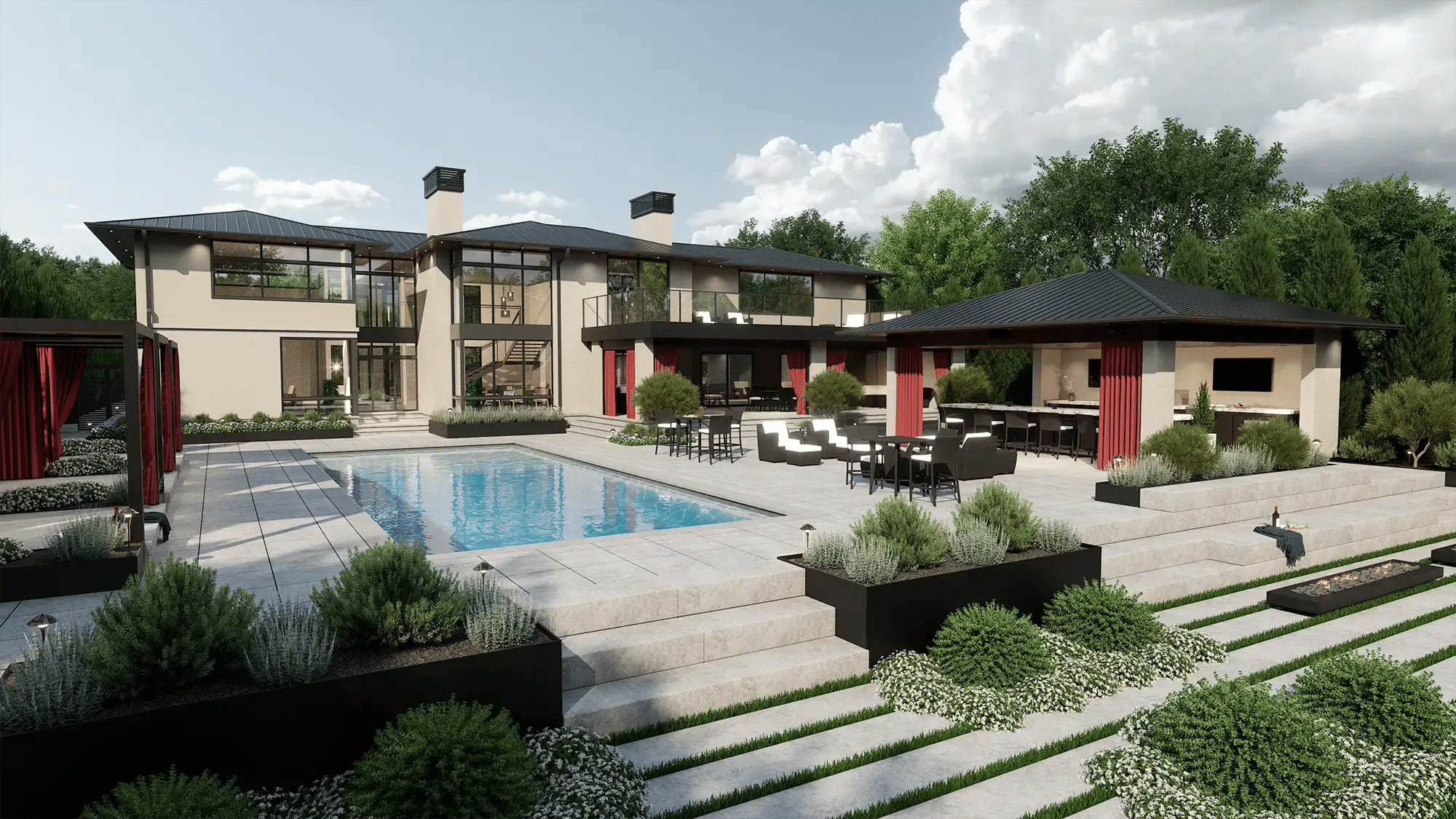




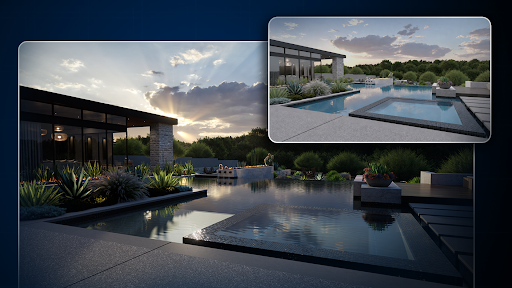
The daytime views went well, and then the client asked what the pool would look like at night.
That's the question path tracing answers best. It follows the light as it bounces through the scene, so the step lights, the pool glow, and the fire bowl light the space as they will on site.
We brought path tracing into Vip3D in 2026 for exactly that moment, and it works from the same file you design in, so the night view doesn't mean rebuilding anything.
Key Takeaways
- Path tracing follows light bounce by bounce. It averages many random light paths per pixel to produce an image.
- Water, glass, and night lighting change the most. Those are the places where light passes through a surface or mixes from many fixtures.
- Each image takes longer and leans on the graphics card. A path-traced still takes seconds to minutes, depending on settings and hardware.
- Real-time 3D is the place to design. In Vip3D, the path-traced stills come from that same design file.
- Accurate light needs accurate materials. Path-traced light is only as good as the material settings and real-world scale behind it.
Quick answer: What is path tracing?
Path tracing makes an image by following the light the way it really behaves.
|
Path tracing at a glance, effect by effect
Real-time 3D handles each of these well enough to design with, and path tracing takes each one further for the final image.
|
What You're Showing |
In Real-Time 3D |
What Path Tracing Adds |
|
Reflections in pool water |
Live reflections that update as you design |
Reflections of everything in the scene, including what's behind the camera |
|
Light through water and glass |
Fast refraction that keeps the view moving |
Refraction and caustics calculated from the light itself |
|
A covered patio at noon |
Dynamic bounce light while you work |
Every bounce off pale pavers into the ceiling, traced in full |
|
Twenty small lights at night |
Lights that respond as you adjust them |
Every fixture contributes with light and shadow to the surfaces around it |
|
Backlit leaves |
Foliage that reads well at design speed |
Light passing through each leaf |
|
Speed |
Immediate, while you design |
Seconds to minutes per image, depending on settings and hardware |
-1.png?width=473&height=512&name=unnamed%20(4)-1.png)
How does path tracing work?
Every pixel in a path-traced image asks what light reaches the camera through that spot.
To answer it, the software sends a ray out from the camera through the pixel and follows it into the scene.
When a ray hits a surface, it reflects in a direction determined by the material. Polished stone sends it off sharply, rough concrete scatters it widely, and water lets part of it through while reflecting the rest.
The ray keeps bouncing until it reaches a light source or fades out.
One path gives a rough estimate, so the software repeats the process many times per pixel, using slightly different random bounces, and averages the results.
Each of those attempts is called a sample.
With few samples, the image looks grainy, which is the noise you see in a path-traced view that's still resolving; with more samples, the grain settles into smooth, accurate light.
Path tracing vs. ray tracing vs. real-time 3D
The three terms get used loosely, and the difference matters when you're choosing settings.
Real-time 3D draws the scene fast enough to move through it smoothly, using clever estimates for shadows, reflections, and indirect light. It's what you design in, and in modern engines, it looks very good.
Ray tracing casts rays to achieve specific effects, such as sharp reflections or accurate shadows, and overlays them onto a real-time view. It's a big step up in realism while staying close to interactive speed.
Path tracing traces the full journey of light for every point in the image through many bounces, letting all the effects emerge from a single calculation. It gives up speed to gain accuracy.
When do you need path tracing, and when don't you?
Use path tracing for the few stills that carry the presentation, such as the hero view of the pool, the evening view, or any view where glass or water is the point.
The rest of the project runs better in real-time 3D. While you're laying out zones and trying materials, the view has to keep up with you.
Construction documents don't need it either. Dimensions, material calculations, and specs come from the plan, and a path-traced image doesn't make any of them more accurate.
Where path tracing changes an outdoor design
The biggest changes show up wherever light does something complicated, like passing through water or bouncing into shade.
1. Pool water and caustics
The rippled light on the pool floor, called caustics, comes out of the calculation, and tile and steps bend when you look through the surface. The water reads as a finished pool, with light moving across the floor the way it does on site.
2. Glass railings and polished stone
Reflections pick up the whole scene, and glass shows the slight distortion and tint of the real material. On a raised deck, where a glass railing is there to keep the view open, the image shows how open it will actually feel.
3. Covered spaces and bounce light
Sunlight bounces off pale pavers and walls into the underside of a pergola or a covered kitchen, lifting the shadows the way it does on site. The covered kitchen looks usable at noon, which is closer to how it will feel in person.
4. Night scenes with many small lights
Step lights, pool lights, wall sconces, and fire features each cast their own light and shadow, and their glow mixes on nearby surfaces. A path-traced night view shows whether the steps are lit well enough to walk at night, which symbols on a lighting plan can't.
5. Plants in backlight
Light passes through thin leaves, so trees and grasses glow at the edges when the sun is low behind them. An evening view of a planting bed looks alive, which matters when the planting carries much of the design.
-1.png?width=512&height=288&name=unnamed%20(5)-1.png)
What path tracing needs from your computer
Path tracing leans on the graphics card, and cards with dedicated ray tracing hardware finish images much faster. More samples, higher resolution, and more lights in the scene all add time per image.
Other programs publish their own requirements.
Twinmotion's 2023.1 release notes, for example, list a DirectX 12 graphics card with at least 8 GB of dedicated memory for its path tracer.
Our published system requirements for Version 4 recommend Windows 11, an Intel Core i7 (10th generation or newer), 16GB of RAM, and an Nvidia GeForce RTX 4060 or better. If you're buying a machine for this work, our team will help you pick one.
What to look for in landscape design software with path tracing
Path tracing is most useful when it sits inside the program you design in, so the finished image comes from the same file as the plan.
The Version 4 update in 2026 rebuilt the 3D engine behind VizTerra, Pool Studio, and Vip3D and brought path tracing into Vip3D.
Visualization programs such as Twinmotion are typically paired with a separate modeling or drafting program. In Vip3D, the path-traced image, the 2D plan, and the build-ready construction plans all come from the same project.
Version 4's real-time views use dynamic global illumination for bounced light and DLSS (Nvidia's AI upscaling) to keep the scene moving smoothly while you design.
The advanced lighting controls are exclusive to Vip3D.
|
Workflow Need |
What to Look For |
How Vip3D Addresses It |
|
Accurate final images |
Path tracing from the design file |
Path tracing for physically accurate light in presentation images |
|
The client's real sun |
Sun position by address and date |
True Shadows, which sets the sun by the client's address, date, and time |
|
Skies that light the scene |
HDRI support |
HDRI skies from the library, or your own imported HDRI |
|
Water that reads as water |
Control over reflections and caustics |
Settings for water reflections, sun glitter, and caustics intensity |
|
Materials that react correctly |
Texture maps with real-world scale |
PBR material import with normal, height, roughness, metallic, and AO maps, set to physical width |
|
Camera control |
Real lens and focus settings |
Lens settings from 15mm to 150mm, plus Accurate Focus Mode, which keeps the area you pick sharp while the F-stop sets the blur |
|
Foliage in backlight |
Light through leaves |
Subsurface scattering control for foliage |
Vip3D covers all seven in one program and includes everything in VizTerra and Pool Studio.
If most of your presentations are daytime views without much water or glass, real-time 3D in VizTerra, our landscape design software, may be all you need.
Our Version 4 lighting guide walks through each control, from cloud density to the moon phase.
True Shadows is a good one to learn first, since it places the sun where it will be on a December afternoon or a July morning at the client's address.
FAQs about path tracing
Which 3D landscape design software has path tracing?
Several programs do, including visualization tools like Twinmotion. We at Structure Studios added path tracing to Vip3D in 2026, alongside the tools for designing the project and producing its build-ready construction plans in the same file.
Where does path tracing come from?
The method goes back to a 1986 paper by the computer scientist James Kajiya. For decades, it was too slow for anything but film work; graphics cards with dedicated ray tracing hardware are what brought it into design software.
What is global illumination?
Global illumination is the indirect light that bounces between surfaces, such as sunlight reflecting off a pale patio into the underside of a pergola. Path tracing calculates it in full; in Version 4 of our software, real-time views handle it dynamically while you design.
Does path tracing make a design more accurate?
It makes the light more accurate, as long as the inputs are right. A material with the wrong roughness or a texture at the wrong scale gets traced faithfully and still looks wrong, so set materials to real-world size before you render.
Why do path-traced images look grainy at first?
The grain is noise from having only a few light samples per pixel. If a view still looks grainy when you need it, let it run longer before you save the image, since stopping early keeps the grain in the file.
Does path tracing work on a Mac?
It depends on the program. Twinmotion's 2023.1 release notes state that its path tracer isn't supported on macOS, and Structure Studios software runs on Windows, so check each program's published requirements before you plan around it.
Check the water in your last presentation
Open the last pool you presented and look at the floor of the pool, the underside of the pergola, and the glass railing at dusk. Those three spots show more about your images than any settings menu.
If they look right, your current workflow is serving you well. If they don't, that's exactly where path tracing earns its time.
If a setting doesn't behave the way you expect, our team of dedicated support specialists is always just a call or message away.
Start your free 30-day trial of Vip3D, and path trace the evening view on your next project. No credit card required.